

Income tax filing 2026: A step-by-step guide to this year's tax season

A step-by-step guide for the 2026 tax season.
PHOTO: Unsplash

It's that time of the year again when we have to pay our dues to the government. Yup: Tax season is here again.
If navigating IRAS and Singpass feels confusing, you're not alone. The good news: filing your income tax in Singapore is usually quick and straightforward once you know the steps.
In this guide, we'll walk you through how to file your income tax for YA2025, step by step.
The simplest way to check if you need to file your income tax is to use IRAS' Filing checker service.
But if you received a notification that you're eligible for the No-Filing Service (NFS), let's save you time: you do not need to file your income tax.
If you're under the NFS, your tax details are already automatically entered. All you need to do is log in to verify that the information is accurate. The system may not capture all your tax reliefs or all of your additional income. Considering there are over 1.9 million taxpayers eligible for the NFS, it's quite likely that you fall under this category of taxpayer.
You might also be on the Direct Notice of Assessment (D-NOA) initiative, in which case IRAS sends you your tax bills directly based on your income provided by your employer and the previous year's relief claims. In this case, you still need to check that the information is accurate and make amendments if necessary.
Don't fret if you need to make changes, you can file an amendment using the Amend Tax Bill digital service in myTax Portal within 30 days from the date of your tax bill.
You need to file your income tax if you answer "yes" to one or more of these questions:
March 2026 onwards: Most taxpayers will receive their Notice of Assessment. It includes the amount of income tax to be paid in full within one month via GIRO, AXS station, or Internet Banking. Tip: You can pay via monthly GIRO instalments too. When you will receive your Notice of Assessment depends on your filing status:
- Direct Notice of Assessment (D-NOA): From mid-March 2026
- No Filing Service (NFS)/Required to file taxpayers: Generally, from end-April 2026 to end-September 2026
First things first: Kickstart the e-filing process by logging on to IRAS' myTaxPortal. Have your Singpass on hand, because you'll need to use that to log in after you select Personal Tax.
Tip: We like the Singpass mobile app for its convenience. The Singpass mobile app is much easier than trying to remember or password or jumping through all the 2FA hoops (yes, we've been there).
Once you've set up the app, just follow the onscreen instructions on the IRAS myTaxPortal to quickly enter the system. This usually means scanning the QR code if you're doing your e-Filing via your computer (we prefer this, the screen is larger). It's slightly different via your mobile phone (you'll be clicking instead).
All logged in? Good. Next, click on Individuals > Filing Matters > File Income Tax Return on the top menu bar.
You should then see this: Income, Deductions and Reliefs Statement (IDRS) for the year ended Dec 31, 2025.
On this page, you can view your Total Employment Income earned in 2025 if you are a full-time, salaried employee. You will be seeing sources of income from different employers if you changed jobs part-way last year. Something missing? There's also a link to click so you can check if your employer submitted your employment income information to IRAS.
Next, you'll see your total donations and your total personal reliefs (this includes CPF contributions). If you made voluntary CPF contributions to your own or a loved one's CPF Account or put money into your Supplementary Retirement Scheme last year, that will be reflected here as well.
You will then see your estimated income tax payable. This is based on your income, deductions and reliefs but before any tax adjustments or Parenthood Tax Rebate entitlement.
For those who are self-employed, be it partially or fully, you'll need to go the DIY route. Please follow this guide by IRAS to help you manually enter your income for YA2026.
Renting out rooms or running an online business in addition to your full-time job? The income gained from these ventures has to be declared on your income tax form as well.
These include activities such as:
At the end of the page, you'll see two options under the section: Next Step.
No, this is not a trick question or a Choose Your Own Adventure book. It simply asks if you want to preview your Notice of Assessment (if good to go) or Edit My Tax Form (if you need to make changes).
Go for the second option if you need to declare any extra income, amend or add/remove any personal reliefs.
We're now looking at the Total Donations and Total Personal Reliefs section in more detail. We're already in 2026, so rushing to give $5,000 to your favourite charity or plonking money into your SRS account won't make your income tax amount go away for YA2026. Instead, whatever you do in 2026 will be reflected in your YA2026 tax bill.
So chill.
Anyway, as the name suggests, Total Donations and Total Personal Reliefs work to reduce the amount of tax payable. Your task right now is to check that your total donations and total personal reliefs you've amassed in 2024 are reflected accurately in your YA2026 NOA tax bill.
Here's a list of some typical personal reliefs a Singapore taxpayer would have:
Note: The maximum income tax reliefs are capped at $80,000.
Something missing? Scroll down to the bottom of the page to Next Steps and choose Edit My Tax Form.
All good? Happy with the final amount and you've done all you can to claim all the reliefs? When everything has been amended and is now accurate, it's time to preview your NOA and finally, Send My Tax Bill.
Remember to file your income tax from March 1, 2026 to April 18, 2026. If you miss the April 18 2026 deadline, your tax form may be sent automatically, and/or you may incur penalties like a fine.
Here's what the IRAS website says: "If you fail to file your tax returns for two years or more, you may be issued with a summons to attend Court. On conviction in Court, for each offence, you may be ordered to pay: A penalty that is twice the amount of tax assessed; and a fine of up to $5,000." Ouch.
You will receive your income tax bill, also known as your Notice of Assessment (NOA), from the end of April 2026. This is a statement that tells you how much to pay for your income tax and when to do so. The NOA can be found in your myTax Portal.
The notification that your NOA is ready can be sent via SMS, email or both — you can change this in myTax Portal > Account > Profile > Update Notice Preferences.
Here's another chance to put things right. If there's anything inaccurate on your NOA, go to your myTax Portal and submit an Object to Assessment (top menu bar > Individuals > Filing Matters > Object to Assessment) within 30 days of receiving your NOA. Make sure you have the supporting evidence ready for IRAS' review.
This can be a bit of a hassle, so it's best to ensure everything is accurate on your first submission. For more details, check out IRAS' guide on objecting to your NOA.
Cash? Credit? Cashless? Overseas at the moment? Can't leave home? Well, there are just so many ways to pay:
IRAS will even accept telegraphic transfers if you are overseas and unable to use any of the above payment methods.
After logging into IRAS' myTaxPortal, you'll find yourself on the Overview page. On this page, you'll see a section called Your Tax Overview — What You Need to Do. This neatly summarises your next steps.
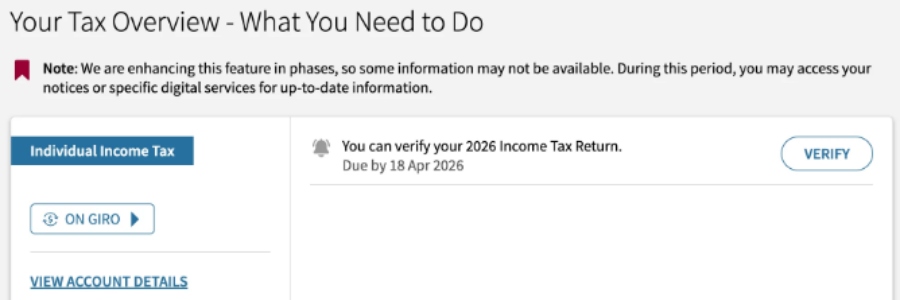
Click on the Verify button to verify your 2026 Income Tax Return.
You'll be brought to the File Income Tax Return page.
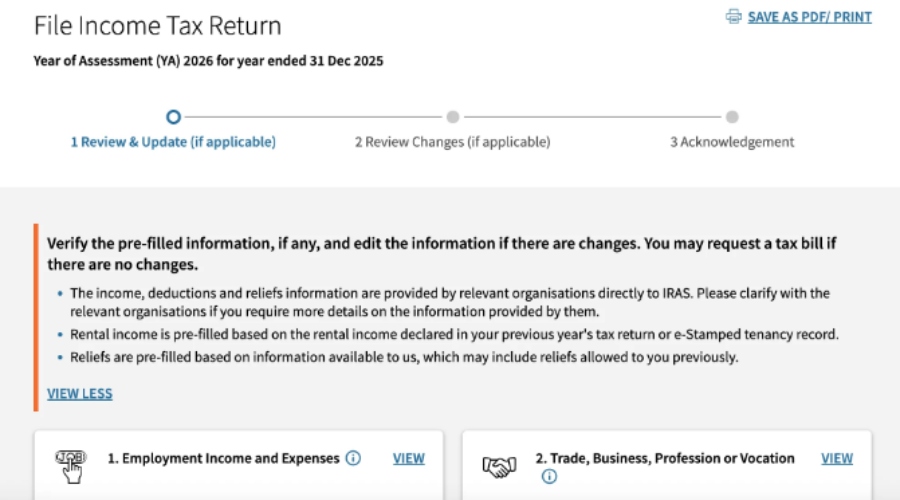
There are four items you need to review on this page:
Here, you can view your total employment income earned in 2025 if you are a full-time, salaried employee. You will be seeing sources of income from different employers if you changed jobs part-way last year.
This includes income from self-employment or sole proprietorships (e.g. PHV/taxi drivers, commission agents), as well as your share of partnership income.
This section will reflect other sources of income such as rental income from property you own.
Next, you'll see your total donations and your total personal reliefs (this includes CPF contributions). If you made voluntary CPF contributions to your own or a loved one's CPF Account or put money into your Supplementary Retirement Scheme last year, that will be reflected here as well.
Finally, you will see your estimated income tax payable. This is based on your income, deductions and reliefs, and is broken down into:
The first line reflects how much of your income IRAS charges tax on. The second line reflects the percentage rates that IRAS applies on that chargeable income.
If there's anything missing in any section, select the "Add New" button under the relevant section.
IRAS says they don't directly offer the option for credit card payments as they incur a high transaction cost. To preserve public funds (taxpayers' money), they need to keep their cost of collection low.
However, there are two workarounds: use a bank tax facilities or third-party platform.
The Standard Chartered Visa Infinite Credit Card lets you pay your taxes with its credit card income tax payment facility, and you'll earn 360° Rewards Points while you're at it. You can then redeem the points you'll earn for miles, cashback, or products.

Do note that there is a one-time processing fee of 1.9 per cent on your tax payable amount.
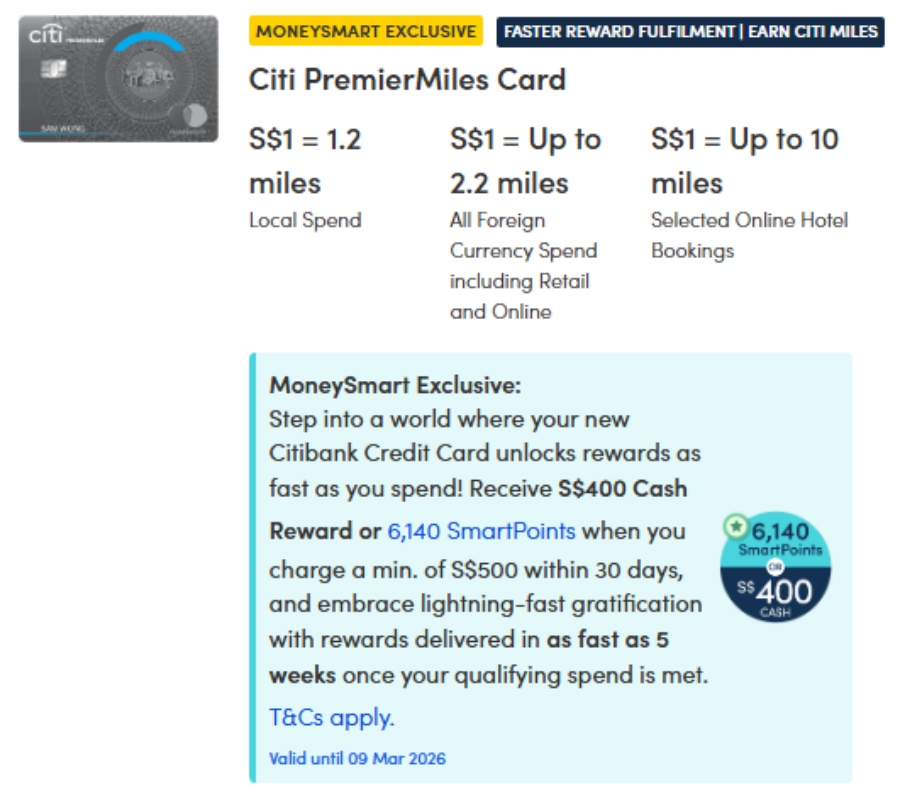
With Citibank's PayAll service, you can pay your taxes (yup, not just limited to income tax) with your Citi credit card. While there is a service fee of 2.6 per cent, you'll earn the base earn rate on your card. i.e. 1.2 miles per $1 on the Citi PremierMiles card.
If your bank doesn't provide a tax payment feature — or you'd like to charge the payment to a different credit card-you can use third-party services such as CardUp. The platform accepts most Singapore-issued cards, including American Express, Citi, HSBC, Maybank, OCBC, POSB, Standard Chartered and UOB.
CardUp fees are typically 2.60 per cent, though recurring income tax payments may qualify for a 1.80 per cent promotional fee with code 18VTAX26 (Visa cards only, valid until March 22, 2026).
Tip: Only use your credit card to pay large income tax amounts to make the processing fees worthwhile. No point in incurring fees and earning only measly miles or rewards points for that effort.
[[nid:727528]]
This article was first published in MoneySmart.